
Propose an architecture change
Use a board branch to explore an alternative design with your agent. The original board stays as it is until a person merges the proposal.
You ask
Section titled “You ask”Open this board: <board link>. Create a board branch named async-checkout. Propose moving email delivery to a queue, show the new failure path, and submit the branch for my review. Leave the original diagram as it is.What happens
Section titled “What happens”- The agent opens the board and calls
create_branch. - It edits the returned branch, which has its own board id and link.
- It calls
submit_branchwhen the proposal is ready. - You open the branch review to inspect additions, removals and changed components.
The branch copies the graph, charts, code refs and change notes. Copied change notes need a fresh review. The branch does not inherit the base session, route or threats.
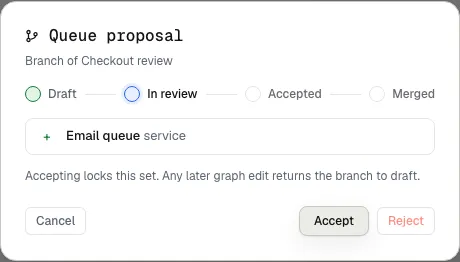
The sample proposal adds one component. The owner can inspect it before acceptance.
Decide what to keep
Section titled “Decide what to keep”A branch of an ordinary board can merge into its base after review. The review dialog explains what will change. The merge keeps unrelated additions made to the base since the branch began.
An imported architecture snapshot represents observed code. Its proposal can be accepted or rejected. After implementation, Check latest import compares the proposal with a newer import. Accepting a design does not rewrite the factual snapshot.
Agents submit proposals. People with the required access accept, reject or merge them. A later graph edit returns the proposal to draft, so the agent must submit it again.
Keep the two kinds of branch separate
Section titled “Keep the two kinds of branch separate”A board branch changes a diagram. It does not create a Git branch, open a pull request, change source files or deploy anything. Ask separately for the code implementation after you settle the design.