
Live embeds
An embed shows a chart or diagram inside another page. It updates as the source changes and uses its own access link. Board sharing can stay off.
Publish a chart or board
Section titled “Publish a chart or board”- As the board owner, select a chart and choose Embed chart.
- For a diagram, choose Embed board, or select Whole board / diagram under Content.
- Inspect the disclosure of what the embed publishes.
- Enable Enable embed access.
- Choose System, Light or Dark.
- Copy the URL for an embed block, or the iframe HTML for a webpage.
For Notion, use /embed and paste the URL. Use a publicly reachable HTTPS
server. A localhost URL works only on devices that can reach that server.
Notion web, desktop and mobile compatibility still needs platform verification.
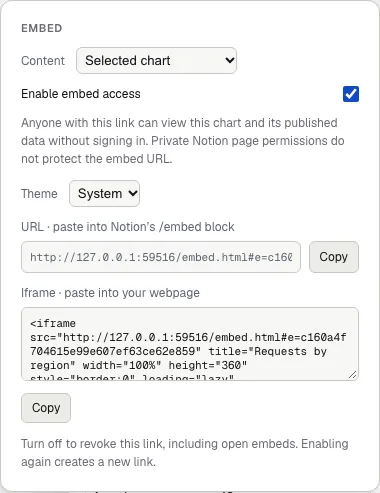
The owner enables access and copies a separate embed link.
What becomes readable
Section titled “What becomes readable”| Embed | Published content |
|---|---|
| Selected chart | Title, subtitle, type, complete CSV, chart options and source |
| Whole board | Visible labels, connections and charts, including later changes |
Hidden nodes and edges stay excluded from a board embed. Embeds do not publish code refs, node docs, source citations, repository files, editor presence or change-note overlays.
For a board, Include threat playback additionally publishes active threat titles, stages, severity and affected anchors. Include previous architecture snapshot publishes the prior diagram as well. Both choices start off.
Anyone holding an embed URL can read its published content without signing in. A private page containing the embed does not protect that URL. Chart and board embed links are independent of each other and of board sharing.
Playback and accessibility
Section titled “Playback and accessibility”Chart viewers offer tooltips, View data, animation pause and replay. Diagram viewers offer pan, zoom, Play, Pause, Replay and optional Loop. Playback can show connection flows, a planned route, included threats or an included architecture comparison. Diagram playback starts paused.
The viewer pauses motion while offscreen or in a hidden tab. Reduced-motion settings show a static result. Pausing animation does not pause live data updates.
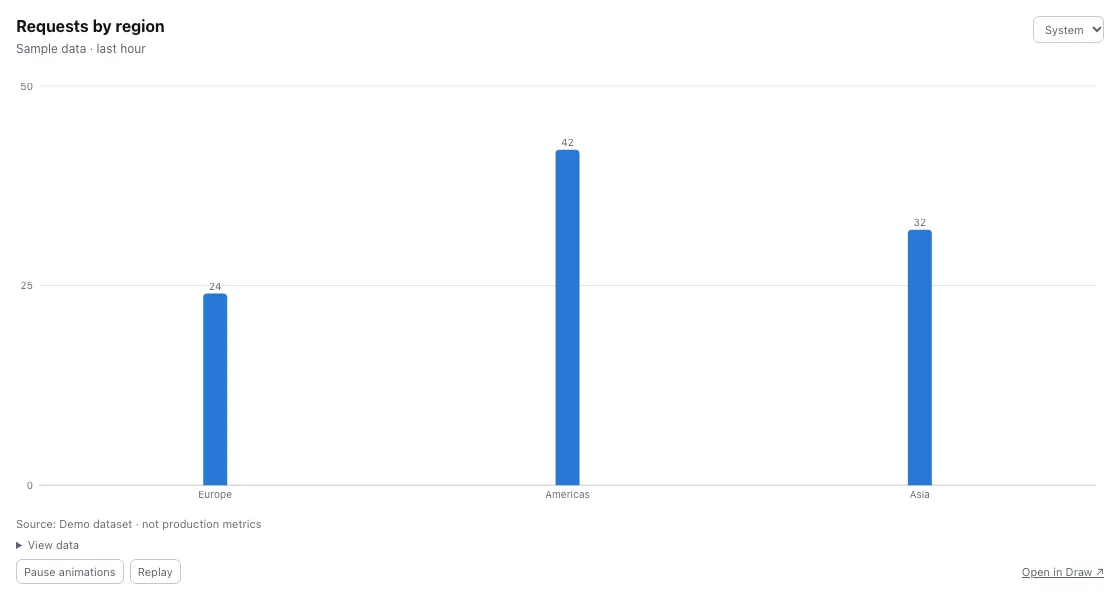
The viewer uses sample data here. It does not expose the board editor or neighboring components.
Revoke access
Section titled “Revoke access”Turn off Enable embed access for that chart or board. Open viewers clear the published content. Enabling it again creates a fresh link. The old link stays invalid. Deleting a published chart or board also revokes its embed.
Revocation cannot retract saved copies. Inspect chart CSV and source labels before publishing. Code consent does not redact those fields.