
Threats
A threat marks one service on the board as compromised or vulnerable. Open its marker to see the blast radius: what that service reaches and what trusts it, hop by hop, over the architecture you already know.
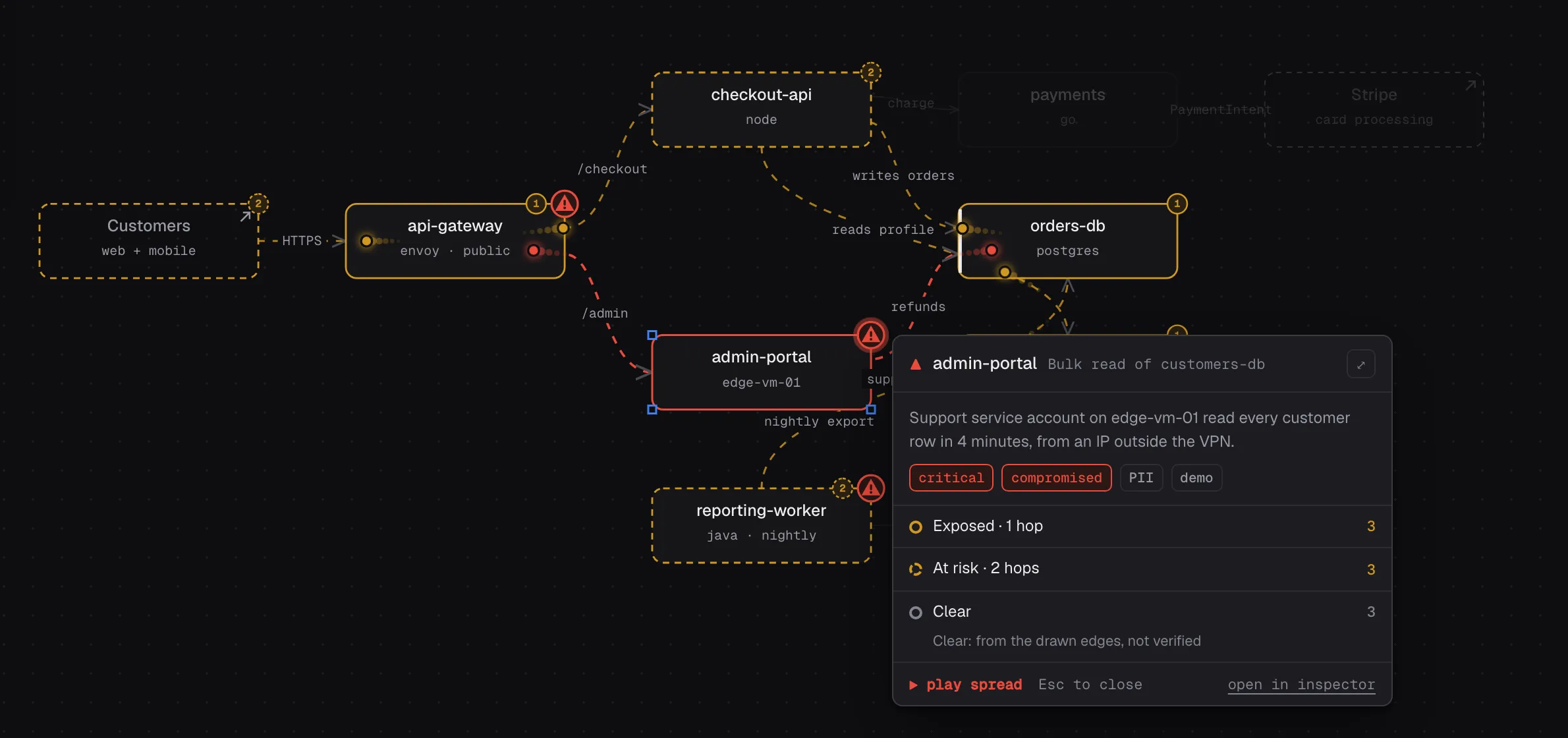
The security demo shows impact over the drawn dependencies.
Ask your agent
Section titled “Ask your agent”Read this SIEM alert and mark the affected service on the board.The rule
Section titled “The rule”- A SIEM alert names a service →
add_threatwith stagecompromised. - A scanner finding → stage
vulnerable, only for critical or high CVEs that have a fix or are on KEV.
The agent reads the alert through your own SIEM or scanner MCP server; draw stores what it is told.
What you see
Section titled “What you see”One red hazard marker on the node. Click it for a card with the alert or CVE, its severity, and counts of exposed, at-risk and clear nodes. While the card is open, clear nodes dim and the blast flows outward. Expand the card to set direction and depth and list every affected node with the reason. Mark contained records that someone dealt with it.
Limits
Section titled “Limits”- The blast radius follows the drawn edges. A node that is not drawn or not connected shows as clear, which never means verified safe.
- It flags; it never blocks, rolls back or pages.
Tools: add_threat, update_threat, remove_threat.