
Map an unfamiliar codebase
Use this for onboarding, a handover, or a repository you need to change. A focused request path gives you a starting point for reading the code.
You ask
Section titled “You ask”Draw how a checkout request moves through this repo: entry point, services, queues and data stores. Cite the line behind every connection. Give each component a short explanation, and distinguish facts from connections you cannot prove.What happens
Section titled “What happens”- The agent reads the entry point and follows its calls into the application.
- It draws components with short docs explaining what they do and why they exist.
- It cites the code behind each connection and lays out the path from left to right.
- It hides secondary components in named groups instead of silently omitting them from an existing map.
The board counts hidden nodes. You can show a group again when you need its detail. An uncited connection is a question to investigate, not evidence that a call exists.
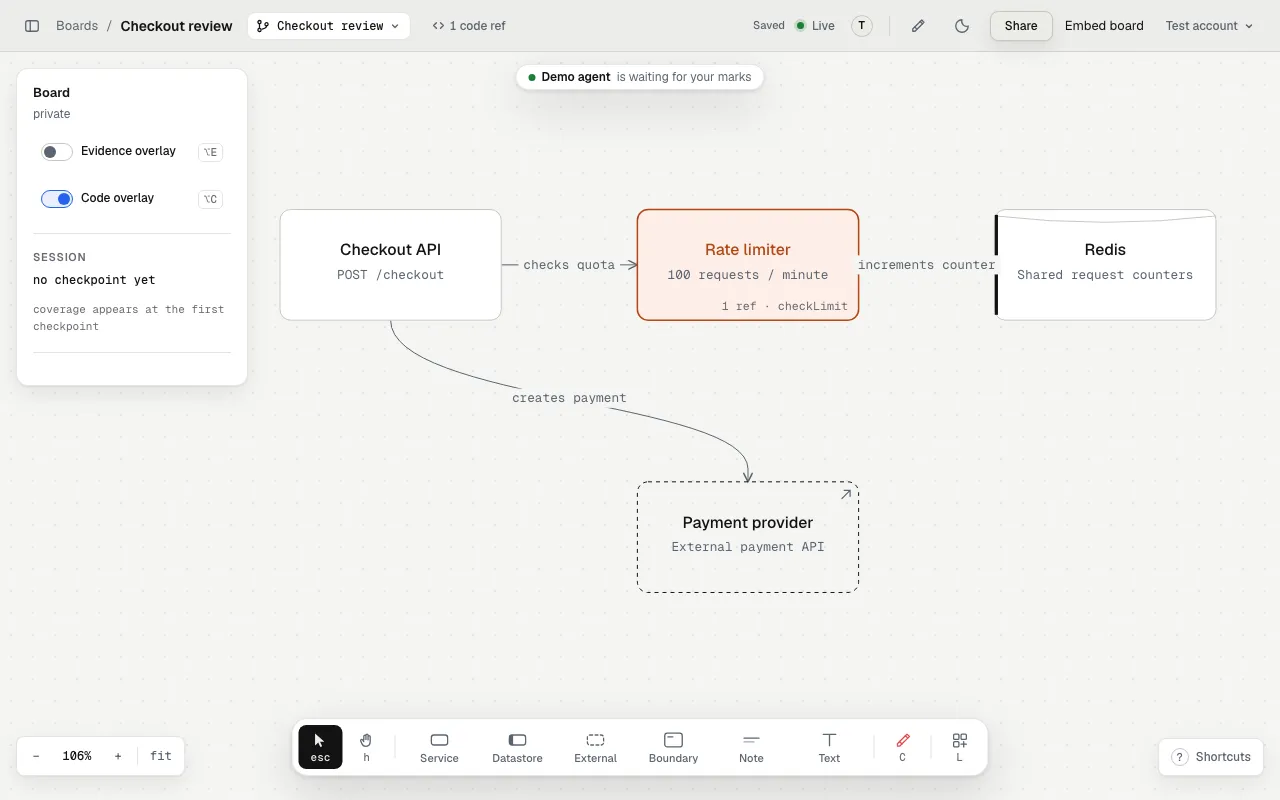
A focused request path gives the reader a place to start.
Turn the map into an explanation
Section titled “Turn the map into an explanation”Ask a follow-up that starts at a specific component:
Walk me from the checkout handler to the payment provider. Show where we retry, where we persist state, and what prevents a duplicate charge. Mark anything you cannot establish from the code.Select a component for its docs and code refs. Use the red crayon to mark a missing dependency or an unclear label.
Hand it to the next person
Section titled “Hand it to the next person”Share a view link for a reader, or use workspace access for continuing collaboration. Code links still require the reader’s access to the GitHub repository.
A map describes the code the agent read. It does not automatically discover production services or prove that the deployed system matches the checkout.