
Investigate an incident
Use a scratch board to collect evidence for one investigation. Put the metrics beside the services they describe, then keep the board for the incident report or delete it afterwards. Scratch boards do not expire automatically.
You ask
Section titled “You ask”Checkout pods have restarted since 14:00 UTC. Use our metrics and Kubernetes tools to compare the hour before and after. Draw the affected services, chart restarts and error rates, and separate observations from hypotheses. Record the source and time window for each chart.Your agent needs access to your metrics, logs or cluster through another tool or MCP server. draw displays the findings. It does not query those systems itself.
What happens
Section titled “What happens”- The agent collects restart counts, error rates and resource measurements for the same time window.
- It draws the affected request path and adds charts with the source of their data.
- It compares the evidence with deployment timing and lists the questions that remain open.
Useful views include a timeseries of restarts, a toplist of errors by
service, and a scatter of memory against restarts. The agent must use measured
values and name unavailable data instead of inventing it.
Read the evidence
Section titled “Read the evidence”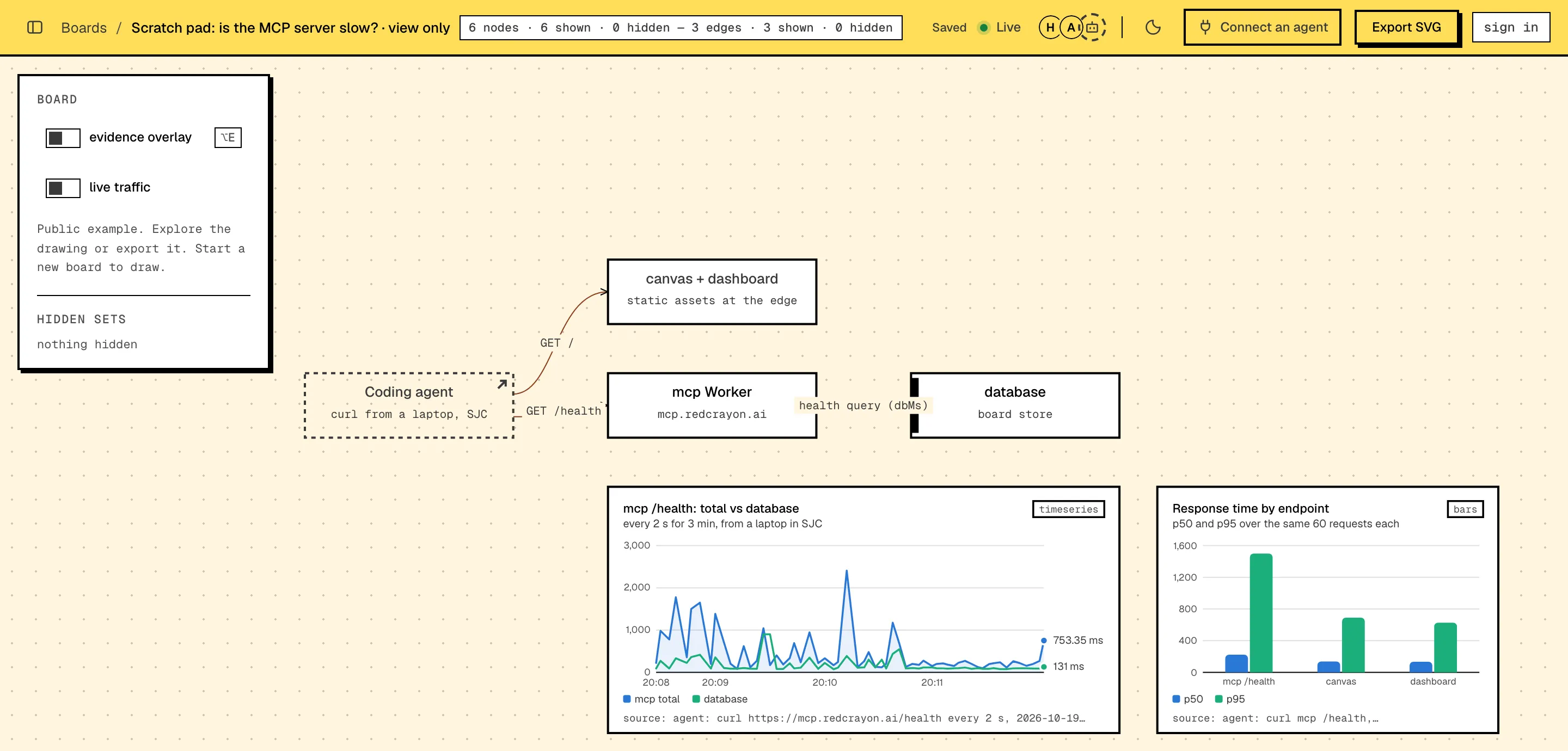
This demo investigates latency. The same layout works for pod churn or errors: a chart answers a question beside the component involved. Correlation alone does not establish a cause.
Narrow the investigation
Section titled “Narrow the investigation”The database time is flat while request duration rises. Compare queue wait and application time for the slow requests. Add the result beside the API, and say which hypothesis it supports or rules out.With trace data, the agent can set measured edge latency or replay one request. For a local reproduction, watch traffic with tap. Chart values update when the agent or a person supplies new data. They do not poll your metrics automatically.
Before you share the report, inspect chart data and source labels for sensitive information. Snippet consent does not filter charts, labels or investigation notes.